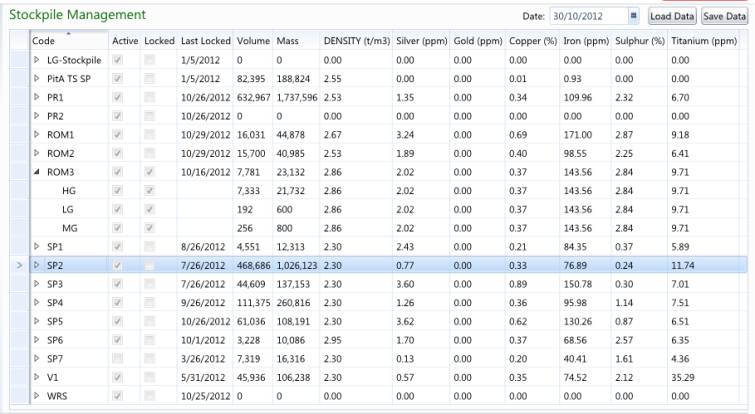
Stock Management pages are used to balance inventories with Survey volumes and to override the contained metal grades with sample data.
Note: The Volume and Mass balances can be adjusted at either the Location level or at the individual Location > Material levels.
Note: The Density and Grade measures can only be adjusted at the Location level.
The above stockpile management page displays the Volume and Mass balances, as well as the Density and Grade attribute measures for the 30/10/2012 for stockpile locations. The ROM3 stockpile has been expanded to display the material balances for the 30/10/2012. The ROM3 stockpile has been locked so that no changes can be made to balances for that day and prior to.
Please refer to the Stock Managment Page UI for information on the functionality of the Stock Management page.
Refer to the Stockpile Management topic under the Navigation Menu Page Types folder for information on creating Stockpile Management pages.